The First EX-AI Deposit Screenshot
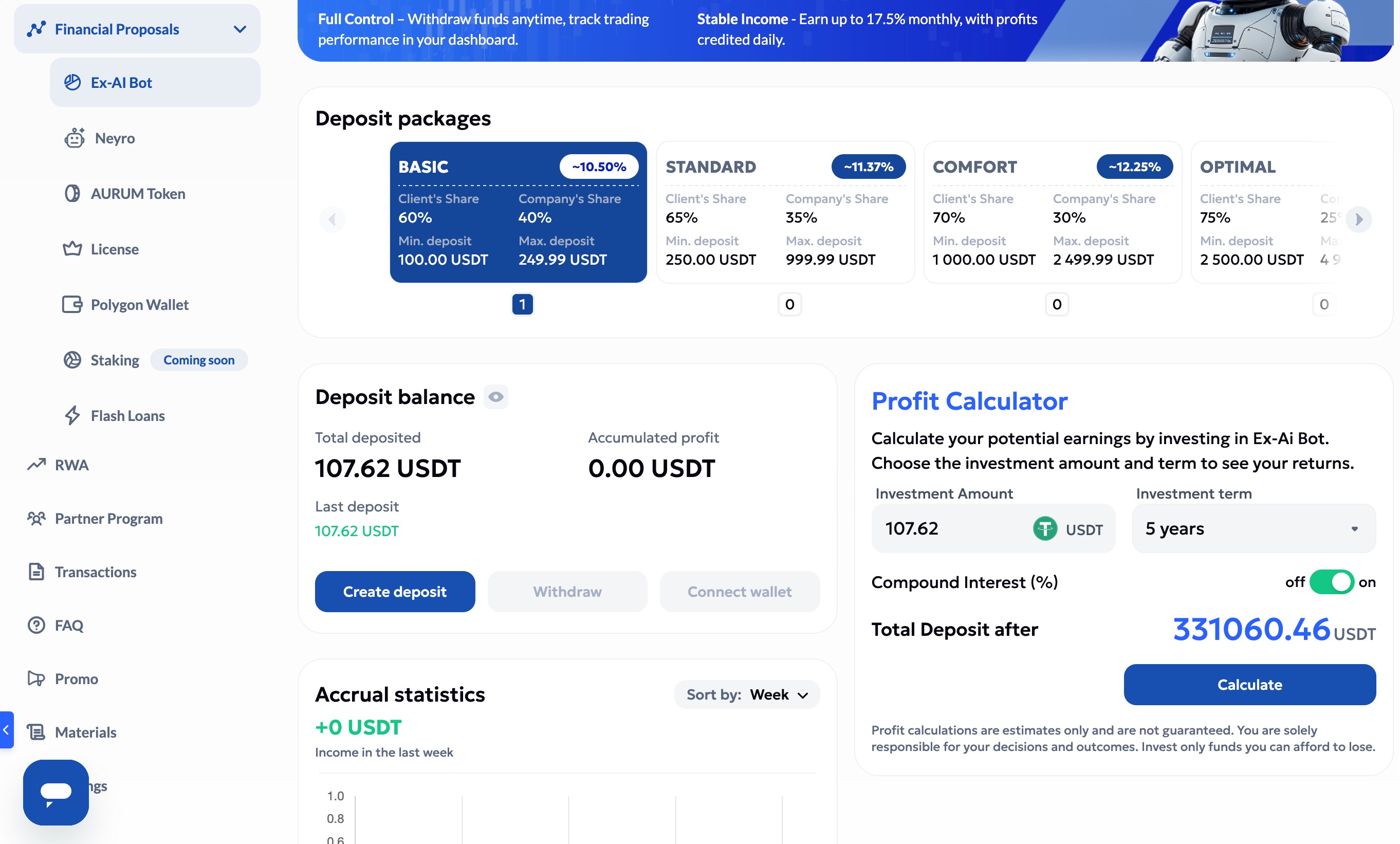
The dashboard screenshot shows a first EX-AI deposit of 107.62 USDT, the Basic EX-AI package selected, and Aurum's profit calculator set to a five-year term. This is why compound interest is so important: the first deposit looks small, but repeated monthly growth can make the curve go vertical.
The Route in One Table
| Step | Action | What to check before continuing |
|---|---|---|
| 1 | Sign up for Aurum through the sponsored UBI.quest link. | Email, password manager, official URL, and the video walkthrough below. |
| 2 | Create or use a Kraken account and buy USDT. | KYC status, available balance, withdrawal hold, USDT support, and fees. |
| 3 | Transfer USDT from Kraken to the Aurum deposit address. | The receiving network must match the Kraken withdrawal network exactly. |
| 4 | Buy the Aurum subscription or license required for EX-AI. | Subscription cost, renewal date, and whether it matches your first deposit size. |
| 5 | Create the EX-AI deposit inside Aurum. | Package range, client/company share, lockup or fee terms, and withdrawal rules. |
1. Sign Up for Aurum
Start with the Aurum registration link: https://go.ubi.quest/aurum. Use a password manager, keep recovery details private, and bookmark the correct page after registration so you do not later search your way into a fake login page.
Inside the dashboard, the screenshot shows the EX-AI Bot section under Financial Proposals, plus menu items for Neyro, License, Polygon Wallet, Transactions, and FAQ. That matters because the setup is not only "send money and hope." You need to know where the license, wallet, and transaction records live before you deposit.
2. Fund Kraken and Buy USDT
Use Kraken as the fiat-to-crypto on-ramp: https://go.ubi.quest/kraken. Create the account, complete verification, deposit cash, and buy USDT only after you understand Kraken's funding limits and withdrawal availability.
Kraken notes that some purchase methods can trigger temporary withdrawal holds. If your USDT is not withdrawable yet, wait rather than changing the plan mid-transfer. Rushed transfers are where small setup mistakes become expensive.
3. Transfer USDT from Kraken to Aurum
This is the step to do slowly. In Aurum, open the wallet or deposit screen and copy the USDT receiving address. Then in Kraken, choose USDT withdrawal, choose the network, paste the address, and confirm the details.
Best practice is to send a small test transfer first when the platform allows it. Once the first amount arrives in Aurum, send the rest. The screenshot's first EX-AI deposit is 107.62 USDT, which fits the visible Basic package minimum of 100 USDT.
4. Buy the Aurum Subscription
The screenshot shows a License section in the Aurum dashboard. Before creating the EX-AI deposit, buy or activate the required subscription/license and write down the renewal date. The subscription is part of your real return calculation because a small deposit can be meaningfully affected by fixed fees.
Check three things before you pay: the exact subscription price, whether it renews automatically, and whether the EX-AI package you plan to use requires a specific tier.
5. Deposit into EX-AI
Open Financial Proposals, then EX-AI Bot, then choose the package that matches your amount. The visible package cards in the screenshot show a tiered structure:
| Visible package | Deposit range shown | Client share shown | Company share shown | Approx. monthly figure shown |
|---|---|---|---|---|
| Basic | 100.00 to 249.99 USDT | 60% | 40% | ~10.50% |
| Standard | 250.00 to 999.99 USDT | 65% | 35% | ~11.37% |
| Comfort | 1,000.00 to 2,499.99 USDT | 70% | 30% | ~12.25% |
| Optimal | 2,500.00 USDT and up in the visible card | 75% | 25% | Partly hidden in screenshot |
The screenshot's 107.62 USDT deposit is a Basic-package sized test. That is the right mindset for a first deposit: prove you understand the dashboard, the transaction history, and the exit route before thinking about bigger numbers.
Withdrawals: Know the Exit Before You Start
Aurum includes a Withdraw button in the EX-AI deposit balance area, but you should understand the rule before relying on it. The current guidance for this page is: do not plan to withdraw from EX-AI during the first year, because a fee applies within the first year. Verify the exact fee, date calculation, and exceptions inside Aurum before funding.
Neyro Alternative: Higher Reported Results, Different Risk Shape
Aurum also shows Neyro in the dashboard. The reason Neyro is interesting is structural: it is presented as the alternative where funds stay connected to your own wallet rather than being placed into an EX-AI deposit package. That can reduce custody concern, but it does not remove trading, wallet, contract, permission, liquidity, or market risk.
I looked for independently indexed public Neyro result pages on July 10, 2026 and could not verify a reliable public result table from search results. Because of that, this page does not invent a numerical Neyro leaderboard. The claim to use carefully is this: Neyro is being discussed as potentially higher than the 14% average promoted on UBI.quest, but users should require dated screenshots, wallet addresses where appropriate, drawdown history, and withdrawal evidence before treating that as evidence.
Your funds are described as staying in your wallet, which changes the custody question.
Understand exactly what the wallet connection can approve, spend, trade, or revoke.
Ask for net returns, losing periods, fees, and withdrawal or wallet-level proof.
Sources and Evidence Used
- UBI.quest Aurum EX-AI dashboard screenshot captured July 10, 2026.
- Aurum signup video tutorial.
- Aurum withdrawal video tutorial.
- Kraken withdrawal network guidance, last updated October 15, 2025.
Start small, then let the math prove itself
Use Aurum only after you understand the subscription, transfer network, EX-AI package, first-year withdrawal fee, and compounding assumptions.